
GU Samarth Portal – Gauhati University Login, Result & Exam Form Guide
Gauhati University (GU), Guwahati, uses the Samarth eGov Suite as its official student portal for examination forms, admit cards, and results, alongside a separate admission system for new applicants. This page covers everything about GU Samarth Portal, including login, registration, examination-related services, and how it connects to Assam’s broader state admission system.
What Is GU Samarth Portal?
GU Samarth Portal is Gauhati University’s dedicated instance of the Samarth eGov Suite, the ERP framework backed by the Ministry of Education. For enrolled students, GU manages exam forms, admit cards (“hall tickets”), and results primarily through its student portal. It’s important to understand that GU actually operates two related but separate domains:
- gauhati.samarth.edu.in — the student-facing portal used for login, examination forms, admit card downloads, and results.
- gauhati.samarth.ac.in — an administrative/base login domain associated with the same Samarth eGov Suite deployment.
Students should generally use the .edu.in version for day-to-day academic services like login, exam forms, and results.
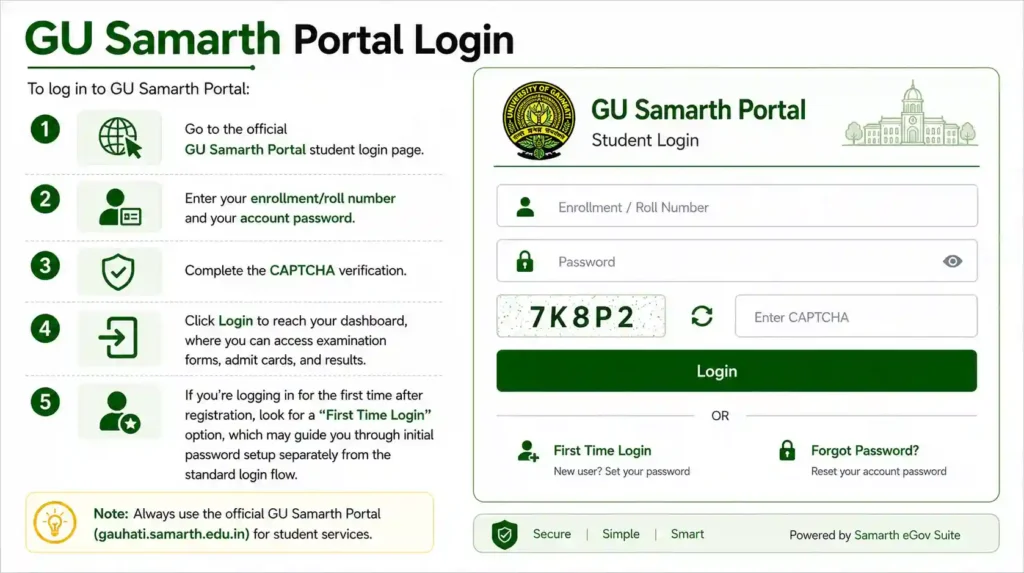
GU Samarth Portal Login
To log in to GU Samarth Portal:
- Go to the official GU Samarth Portal student login page.
- Enter your enrollment/roll number and your account password.
- Complete the CAPTCHA verification.
- Click Login to reach your dashboard, where you can access examination forms, admit cards, and results.
If you’re logging in for the first time after registration, look for a “First Time Login” option, which may guide you through initial password setup separately from the standard login flow.
GU Samarth Portal Registration
New students register on GU Samarth Portal as follows:
- Visit the official GU Samarth Portal and click New Registration.
- Enter your enrollment number, full name exactly as it appears in university records, programme, date of birth, and registered mobile number.
- Complete OTP verification sent to your registered mobile number.
- Set your account password.
If the portal shows a “name mismatch” error during registration, this usually means the name entered doesn’t exactly match what’s recorded in GU’s official database. In this case, contact your college office to confirm the exact name on file before retrying registration.
GU Samarth Portal Admission (UG, PG, and Ph.D.)
Gauhati University’s admission process works differently depending on the programme level:
- UG Admissions (FYIMP/FYUGP): New undergraduate applicants apply through the Assam Samarth Admission Portal — a state-level system covering GU and its affiliated colleges across Assam — rather than directly through GU’s own student portal.
- PG, Ph.D., and Integrated Programmes: These applications go through GU’s own dedicated Samarth admission portal, separate from both the UG state-level system and the day-to-day student portal used after enrollment.
- Ph.D. Admissions: Involve entrance tests, fellowship information, and supervisor listings, with applications submitted through the GU-specific Samarth admission portal.
- Distance Education (GUCDOE): Open and distance learning programmes through GU’s Directorate of Distance Education are managed through a separate portal distinct from the main Samarth systems described above.
Because GU sits at the center of Assam’s higher education digitization, understanding which specific portal applies to your admission type — state-level Assam Samarth for UG, or GU’s own Samarth instance for PG/Ph.D. — is essential before you start your application.
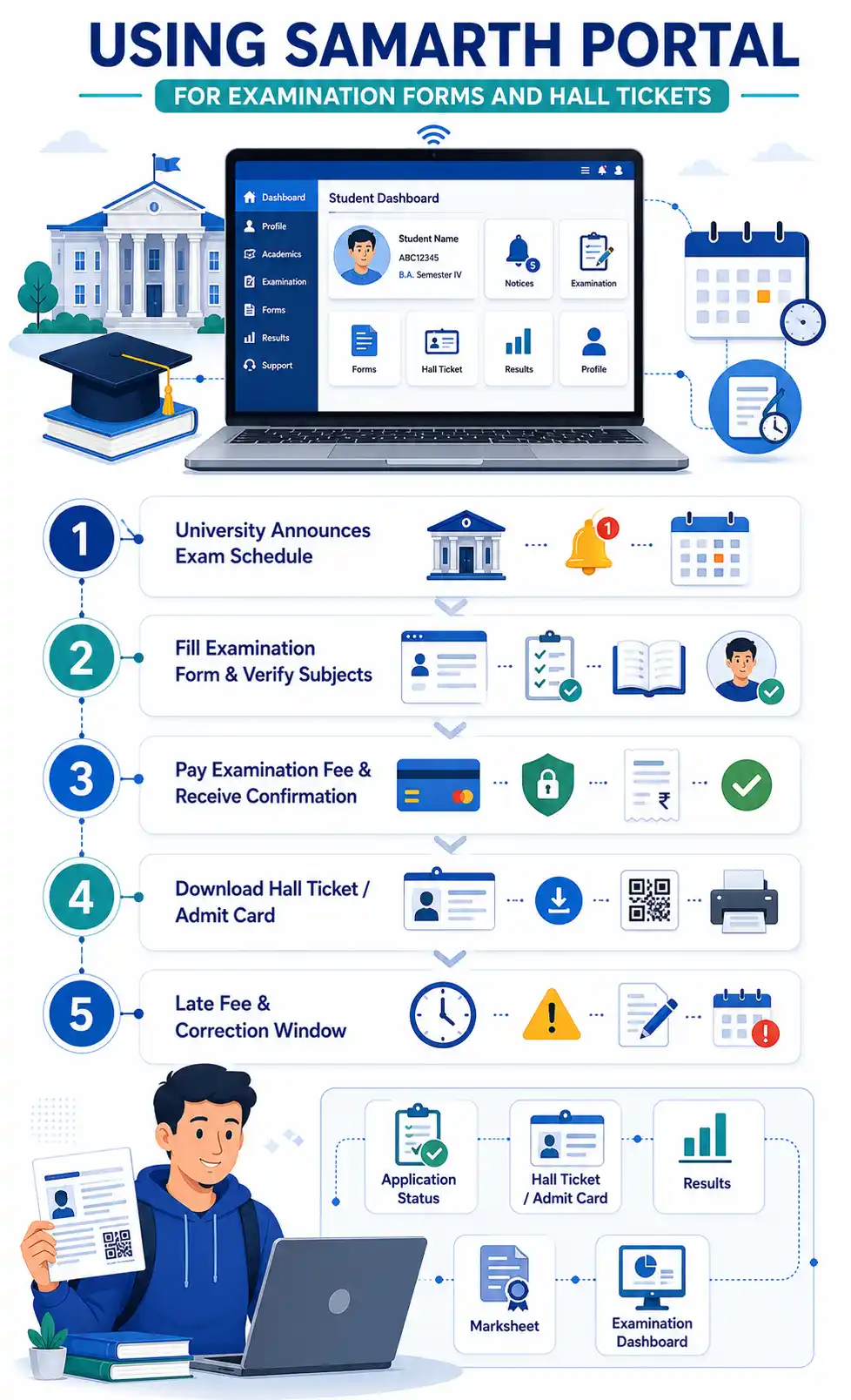
GU Samarth Portal Examination Form
Before each semester examination, Gauhati University opens the exam form window on the Samarth Portal:
- Log in to your GU Samarth Portal account.
- Go to the Examination section and select your current session.
- Verify your registered subjects are correct.
- Submit the form along with the applicable examination fee.
Students at GU-affiliated colleges should note that their college may also need to verify and forward their exam form after online submission — so it’s best to submit well before the deadline to give your college enough time to complete their part of the process.
GU Samarth Portal Admit Card / Hall Ticket
GU releases admit cards through the Samarth Portal ahead of each examination:
- Log in to your account.
- Go to the Hall Ticket / Admit Card section.
- Download your admit card and carefully verify your name, roll number, subjects, and exam centre — GU has multiple examination venues across its affiliated colleges, so confirming the correct centre is especially important.
GU Samarth Portal Result
Once results are declared, log in to your GU Samarth Portal account and check the Results section to view your marks, and download your grade sheet for your records. Result declaration dates vary by semester and programme, so check official GU notices for the current schedule rather than assuming a fixed timeline.
GU-Affiliated College Portals vs. the Main University Portal
Some GU-affiliated colleges operate their own college-level Samarth portals in addition to the main university-level portal, which can cause confusion about which one to use for a given task. As a general rule:
- The university-level portal (gauhati.samarth.edu.in) handles exam-related functions — exam forms, admit cards, and results.
- College-level portals typically handle internal, college-specific functions.
If you’re unsure which portal applies to a specific task, check with your college office directly.
GU Samarth Portal Helpline
If you run into persistent login, payment, or document upload issues on GU Samarth Portal, the fastest resolution is to contact Gauhati University’s dedicated Samarth support system, with contact details available in the portal’s Help section, or to reach out to your affiliated college’s examination cell directly.