
Samarth Portal Login – Student, Employee & University-Wise Login Guide
If you’re trying to access your account, this page walks you through Samarth Portal login — for students, staff, and faculty — across every major university and state instance currently using the platform. Since Samarth Portal is deployed independently by each institution, there is no single universal login page; instead, you’ll find direct guidance below for finding and using your specific university’s login link.
How to Log In to Samarth Portal (General Steps)
- Search for your university’s name + “Samarth Portal” and open the official result from your institution’s website (never a third-party or unofficial link).
- Click Login on the portal’s homepage.
- Enter your username — this is usually your registered email address, enrollment number, WRN (Web Registration Number), or employee ID, depending on your role and registration stage.
- Enter your password.
- Complete the CAPTCHA if prompted.
- Click Login to reach your dashboard.
If this is your first time accessing the portal, you’ll need to complete registration before a login becomes available — see our full registration guide for step-by-step instructions.
Samarth Portal Student Login
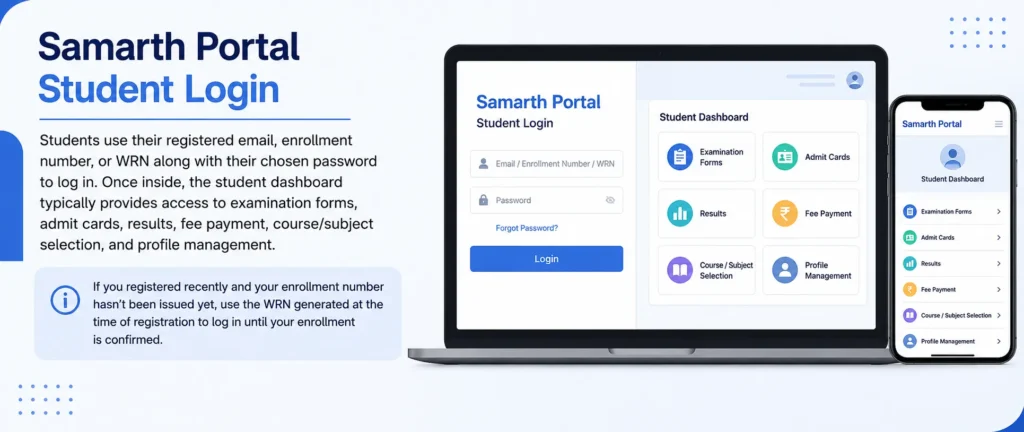
Students use their registered email, enrollment number, or WRN along with their chosen password to log in. Once inside, the student dashboard typically provides access to examination forms, admit cards, results, fee payment, course/subject selection, and profile management. If you registered recently and your enrollment number hasn’t been issued yet, use the WRN generated at the time of registration to log in until your enrollment is confirmed.
Samarth Portal Employee, Teacher, and Faculty Login
Samarth Portal isn’t only for students — university staff also have dedicated login access:
- Employee Login: Used by non-teaching staff for HR functions such as leave applications, attendance, and administrative record access.
- Teacher/Faculty Login: Used by teaching staff to enter internal assessment marks, mark attendance, and manage course-related records for the classes they teach.
- Principal/Admin Login: Provides higher-level access for approving admissions, verifying documents, and managing institutional-level settings, typically reserved for department heads or college administrators.
Each of these logins uses the same portal infrastructure as the student login but routes to a different dashboard based on the account type registered by the university’s admin team. If you’re university staff and don’t yet have login credentials, your IT or HR department will typically create your account and share initial login details directly.
State-Wise Samarth Portal Login
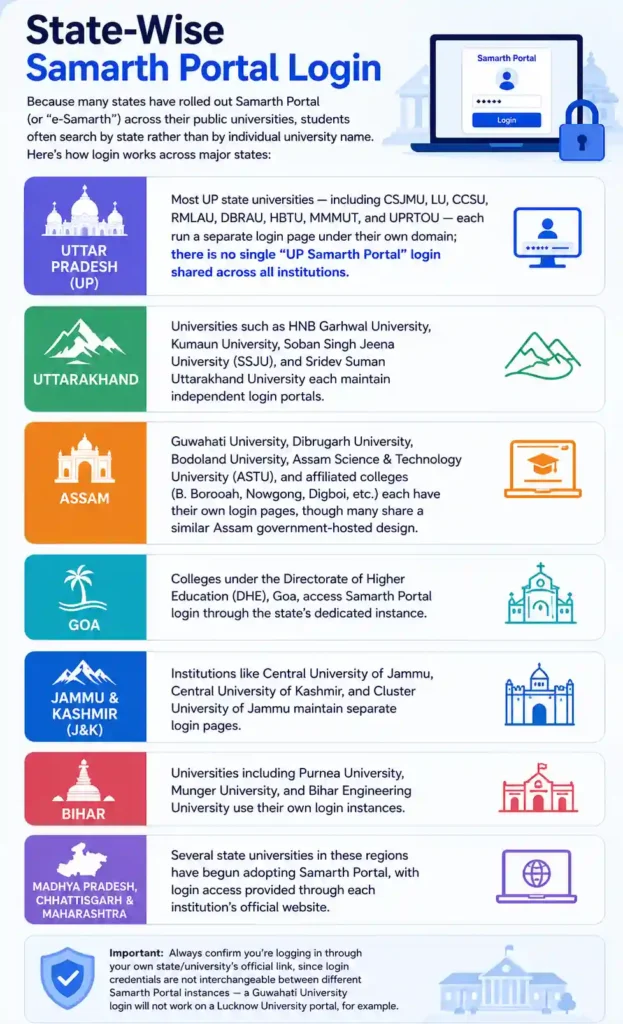
Because many states have rolled out Samarth Portal (or “e-Samarth”) across their public universities, students often search by state rather than by individual university name. Here’s how login works across major states:
- Uttar Pradesh (UP): Most UP state universities — including CSJMU, LU, CCSU, RMLAU, DBRAU, HBTU, MMMUT, and UPRTOU — each run a separate login page under their own domain; there is no single “UP Samarth Portal” login shared across all institutions.
- Uttarakhand: Universities such as HNB Garhwal University, Kumaun University, Soban Singh Jeena University (SSJU), and Sridev Suman Uttarakhand University each maintain independent login portals.
- Assam: Guwahati University, Dibrugarh University, Bodoland University, Assam Science & Technology University (ASTU), and affiliated colleges (B. Borooah, Nowgong, Digboi, etc.) each have their own login pages, though many share a similar Assam government-hosted design.
- Goa: Colleges under the Directorate of Higher Education (DHE), Goa, access Samarth Portal login through the state’s dedicated instance.
- Jammu & Kashmir (J&K): Institutions like Central University of Jammu, Central University of Kashmir, and Cluster University of Jammu maintain separate login pages.
- Bihar: Universities including Purnea University, Munger University, and Bihar Engineering University use their own login instances.
- Madhya Pradesh, Chhattisgarh, and Maharashtra: Several state universities in these regions have begun adopting Samarth Portal, with login access provided through each institution’s official website.
Always confirm you’re logging in through your own state/university’s official link, since login credentials are not interchangeable between different Samarth Portal instances — a Guwahati University login will not work on a Lucknow University portal, for example.
University-Wise Samarth Portal Login – Quick Reference
Students frequently search for login access by specific institution name. The following universities and institutes each maintain their own Samarth Portal login page, accessible through their official website: Dr. Harisingh Gour Vishwavidyalaya (DHSGSU), Soban Singh Jeena University (SSJU), UP Rajarshi Tandon Open University (UPRTOU), Delhi Skill and Entrepreneurship University (DSEU), Khwaja Moinuddin Chishti Language University (KMCLU), Madan Mohan Malaviya University of Technology (MMMUT), Dr. Bhimrao Ambedkar University, Agra (DBRAU), Bodoland University, Guwahati University, Pondicherry University, Gurugram University, Guru Ghasidas Vishwavidyalaya (GGU), Guru Ghasidas Vishwavidyalaya alt. spelling (GGV), Sampurnanand Sanskrit Vishwavidyalaya (SSVV), Ambedkar University Delhi (AUD), University of Hyderabad (UOH), Central University of Tamil Nadu (CUTN), Raja Mahendra Pratap Singh University (RMPSU/RMPSSU), ICAR-affiliated institutes, Maulana Azad National Urdu University (MANUU), North Eastern Hill University (NEHU), Guru Jambheshwar University (GJU), National Forensic Sciences University (NFSU), Tata Institute of Social Sciences (TISS), Cochin University of Science and Technology (CUSAT), Harcourt Butler Technical University (HBTU), Aligarh Muslim University (AMU), Devi Ahilya Vishwavidyalaya (DAVV), Lucknow University (LU), Chaudhary Charan Singh University (CCSU), Deenbandhu Chhotu Ram University of Science & Technology (DCRUST), Rajiv Gandhi University (RGU), Sridev Suman University, Doon University, IIT Mandi, Central University of Kashmir, Central University of Andhra Pradesh (CUAP), and Chhatrapati Shahu Ji Maharaj University, Kanpur (CSJMU).
For any institution not listed above, search “[your university name] Samarth Portal login” and navigate to the result hosted on your university’s official domain.
Logging In with Your ABC ID on Samarth Portal
Some universities allow students to link or log in using their Academic Bank of Credits (ABC) ID as part of their Samarth Portal profile, particularly for NEP 2020-aligned credit tracking. If your university supports this, the option to link your ABC ID typically appears in your profile settings after your first standard login — it is not usually a separate login method on its own, but rather an additional identity linked to your existing student account.
Jan Samarth Portal Login (Different From Samarth Portal Login)
If you’re specifically trying to access Jan Samarth Portal — the separate national platform for government-backed loans (education loans, business loans, etc.) — note that this uses its own login system entirely independent from your university’s Samarth Portal. Jan Samarth Portal login works by connecting to your chosen lending bank’s credentials (such as SBI, PNB, Indian Bank, or other partner banks), since it acts as a common gateway linking borrowers to multiple government-scheme lenders. If you’re looking for an education loan application rather than exam forms or admit cards, you need Jan Samarth Portal, not your university’s student login.
Login Troubleshooting
If your Samarth Portal login isn’t working, work through these steps:
- Double-check your username format — some institutions require your email, others your enrollment number or WRN.
- Use “Forgot Password” on the login page and follow the OTP verification process using your registered mobile number or email.
- Clear your browser cache or try a private/incognito browsing window if the login page won’t load properly.
- Confirm you’re on the correct university’s login page — entering correct credentials on the wrong institution’s portal will always fail.
- Try during off-peak hours if the page is timing out, since login servers can slow down during high-traffic periods like examination form deadlines.
- Contact your university’s IT or examination helpdesk if none of the above resolves the issue, since only university staff can manually verify or reset accounts tied to specific student or employee records.
A Note on Other “Samarth” Login Portals
A few other government platforms also use the “Samarth” name and are sometimes confused with the student login covered here:
- Samarth Panchayat Portal — a separate login system under the Ministry of Panchayati Raj, unrelated to student academics.
- Samarth Recruitment Portal — some states operate a separate Samarth-branded portal specifically for staff or teacher recruitment, distinct from the student/employee ERP login discussed on this page.
- Jan Samarth Portal — covered above; a national loan platform, not a university system.
If you land on a login page that doesn’t match what you’re trying to do (examination forms vs. loans vs. recruitment), double-check the exact platform name before entering any credentials.