
IGNOU Samarth Portal – Login, Admission, Registration & Exam Guide
Indira Gandhi National Open University (IGNOU) uses the Samarth eGov Suite as its official digital platform for admissions, re-registration, examination forms, assignments, results, and fee payment. This page explains the different IGNOU Samarth Portal links, what each one is used for, and how to complete common tasks like registration, admission, and B.Ed applications.
What Is IGNOU Samarth Portal?
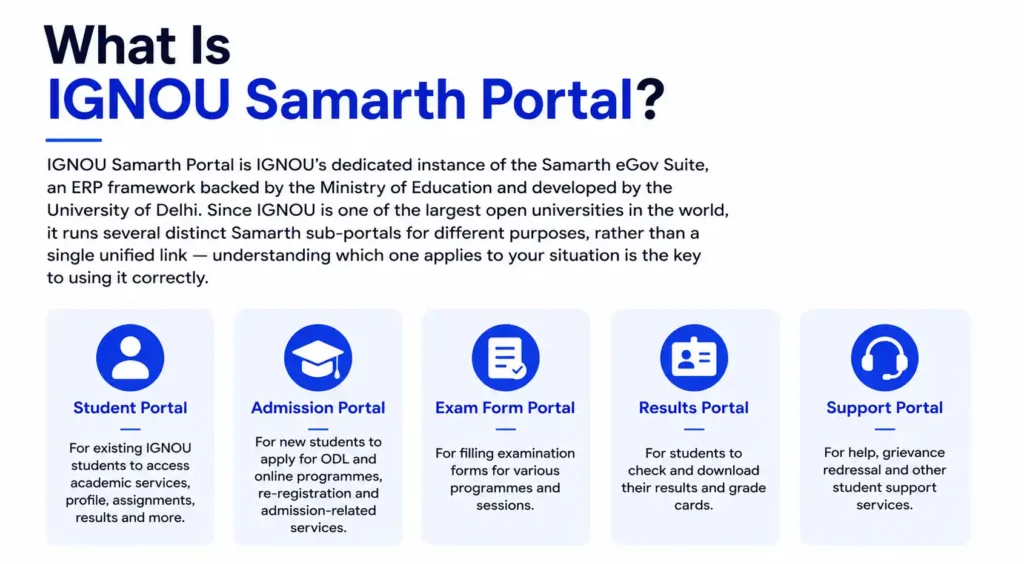
IGNOU Samarth Portal is IGNOU’s dedicated instance of the Samarth eGov Suite, an ERP framework backed by the Ministry of Education and developed by the University of Delhi. Since IGNOU is one of the largest open universities in the world, it runs several distinct Samarth sub-portals for different purposes, rather than a single unified link — understanding which one applies to your situation is the key to using it correctly.
IGNOU Samarth Portal Links – Which One Do I Use?
- Student Portal (ignou.samarth.edu.in / ignou.samarth.ac.in): Used by already-enrolled students for re-registration, fee payment, examination forms, assignment status, admit card download, results, and ID card generation.
- Admission Portal (ignouadmission.samarth.edu.in): Used by new applicants applying to IGNOU’s Open and Distance Learning (ODL) programmes for the first time.
- B.Ed Admission Portal (ignou-bed.samarth.edu.in): A separate portal specifically for IGNOU’s B.Ed entrance test application and admission process.
- University Admissions Portal (for Ph.D. and similar research programmes): A dedicated portal for research-level admissions, including Ph.D. applications based on JRF/UGC-NET/entrance criteria.
If you land on the wrong sub-portal for your specific need — for example, trying to submit an examination form on the admission portal — you won’t find the option you’re looking for, since each link serves a distinct stage of the student journey.
IGNOU Samarth Portal – New Admission (ODL Programmes)
To apply for admission to an IGNOU Open and Distance Learning programme:
- Visit the IGNOU admission Samarth Portal and review the current admission cycle and available programmes.
- Download and carefully read the Common Prospectus, noting eligibility, fees, and programme duration.
- Click New Registration, choose a username (8–16 characters) and a strong alphanumeric password (8–16 characters).
- After submitting your basic registration, you’ll receive your username via email and SMS — keep this safe for future logins.
- Log in, fill in your academic details, upload required documents (educational qualification, experience certificate if applicable, and category certificate for SC/ST/OBC candidates — each under 200 KB in JPEG/PDF format), and select your desired programme.
- Preview your form carefully before final submission, then pay the admission fee online.
The registration fee is generally non-refundable except in specific circumstances defined by IGNOU’s refund policy, so review your programme choice and eligibility carefully before completing payment.
IGNOU Samarth Portal – Registration and Re-Registration
For continuing IGNOU students, re-registration each session (rather than a fresh “new registration”) is required to continue into the next semester or year of your programme:
- Log in to the IGNOU Samarth Student Portal using your enrollment number and password.
- Navigate to the Re-Registration section.
- Select your current programme and the courses applicable for the upcoming session.
- Pay the re-registration fee online.
- Save your confirmation receipt for your records.
Re-registration deadlines are announced separately for each admission cycle (such as the January and July sessions), so always check current IGNOU notices for the exact dates rather than assuming a fixed annual date.
IGNOU B.Ed Samarth Portal
IGNOU’s B.Ed programme uses its own dedicated Samarth-based entrance and admission portal, separate from the general ODL admission and student portals. Candidates apply for the B.Ed entrance test through this specific portal, and hall tickets for the entrance test are released through the official IGNOU website rather than the Samarth portal itself in some cycles — always check the latest instructions published alongside the B.Ed admission notice.
IGNOU Samarth Portal – Examination Form, Admit Card, and Results
Once enrolled, students use the main IGNOU Samarth Student Portal for term-end examination services:
- Log in with your enrollment number and password.
- Go to the Examination Form section and select your current term-end exam session.
- Verify your registered courses and pay the applicable examination fee.
- Closer to the exam date, download your admit card/hall ticket from the same dashboard, and carefully check your name, enrollment number, exam centre, date, and time.
- After the exam, log back in to check your result and download your grade card once it’s published.
IGNOU Samarth Portal – ID Card, Assignment Status, and Fee Payment
- ID Card: A digital student identity card is available for download in PDF format from your Samarth Portal dashboard, which can be printed for verification purposes.
- Assignment Status: Some regional centres accept assignment submission or status tracking directly through Samarth Portal, though several regional centres still use IGNOU’s separate assignment status system, so check with your specific regional centre if you can’t find this option on Samarth.
- Fee Payment: All admission, re-registration, and examination fees are paid online through the Samarth Portal’s integrated payment gateway, supporting UPI, debit/credit card, and net banking. If a payment is deducted but not reflected in your account status, avoid repaying immediately — wait for reconciliation and contact your regional centre if it isn’t resolved within a reasonable period.
Troubleshooting IGNOU Samarth Portal
- Portal slow or not loading: This is common during peak periods like admission deadlines, re-registration closing dates, and admit card release days. Try off-peak hours, clear your browser cache, or switch browsers.
- OTP not received: If your registered mobile number has changed since your original admission, you won’t receive the OTP needed for password reset. In this case, visit your nearest IGNOU Regional Centre in person with your enrollment number and a valid photo ID to update your details.
- Name mismatch errors: Ensure the name you enter matches your IGNOU records exactly — even small spelling differences can cause registration or login issues. Contact your regional centre if you believe your recorded name needs correction.
IGNOU Samarth Portal Helpline and Contact Details
Here’s a more natural and polished version:
If you’ve tried everything and still can’t resolve the issue, it’s time to contact the appropriate support team.
You can reach out to the IGNOU Student Service Centre for assistance with portal-related problems. If your issue requires local support, contact your nearest IGNOU Regional Centre.
For technical issues with the Samarth portal, you can also use the Help or Support section available in your dashboard to submit a support request or get further assistance.